Jira Cloud · Forge app

See what changed in your sprint. Agree what moves out.

Sprint Scope Guard separates remaining pre-start work from issues added after the sprint began, then gives the team a review record it can take into the next conversation.

Three outcomes

A short review with a usable record.

The app supports a current-sprint decision. It does not recreate the original commitment snapshot, provide sprint history, or forecast what will happen next.

01

Review changed work

View remaining pre-start scope separately from additions after the sprint started. If Jira offers a recognised estimate field, scope is shown in story points; otherwise, ticket counts are used and unestimated items are labelled.
02

Agree an action

Authorized project users can approve an added issue, return an added issue to the backlog, or perform a scope swap. The server checks the project and issue before each write action.

03

Export the report

Download the visible current-sprint audit as CSV or JSON, and create a Markdown scope report. Exports are generated in the browser and are not uploaded by the app.

Product view

Built for the conversation after a change lands.

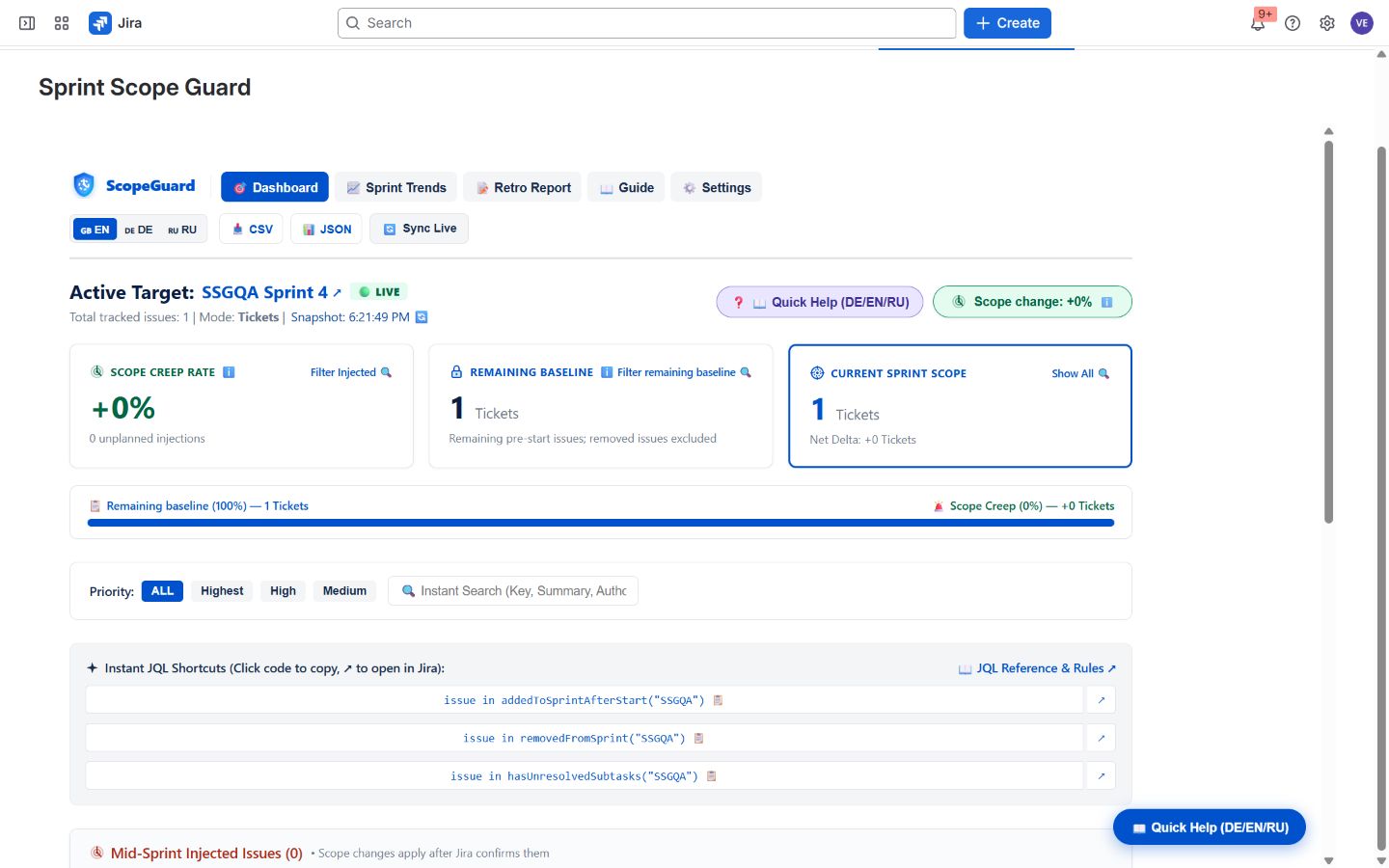
Open the app from the Jira project being reviewed. It reads its active or planned Scrum sprint in that project, and shows an empty state instead of sample issues or fallback figures when data is unavailable.

Sprint Scope Guard dashboard in a Jira QA workspace showing Sprint 4 with one tracked issue and zero added issues.
Jira QA workspace · current-sprint view. Actual Jira QA workspace, 17 September 2026. Click to inspect the current-sprint view.

JQL functions

Bring the same questions into Jira search.

Each function requires a project key. Replace PROJECT_KEY with your Jira project key.

issue in addedToSprintAfterStart("PROJECT_KEY")
issue in removedFromSprint("PROJECT_KEY")
issue in hasUnresolvedSubtasks("PROJECT_KEY")

Jira events refresh stored query results, with an hourly reconciliation for missed updates. Results are eventually consistent.

Data boundary

A focused Jira and Forge workflow.

The current app has no external backend destinations, usage analytics, or webhooks. Minimal failure diagnostics are recorded in Atlassian Forge logs.

What is stored

For scope actions, the app stores bounded governance records in Forge Storage, bound to the project and sprint. Removed-item presentation data is read again from Jira for the viewing user; it is not returned from historic stored copies.

Who can make changes

Settings require project-administrator permission. Approvals, returns to backlog, and scope swaps require Jira project edit, schedule, or administrator permission. Viewers only see data Jira permits them to read.

Pricing

One app, the same functions for every customer.

Free for up to 10 users in your Atlassian app instance. For 11–100 users in that instance, the listed rate is $1.36 per user per month. Larger instances receive volume rates.

A 30-day trial is shown in Marketplace. The Marketplace is the authoritative source for your final quote, based on the number of users in your Atlassian app instance.

View current Marketplace pricing

No feature tiers. Every customer receives the same functions.

Practical Jira guide

Find work added after sprint start.

Use Jira’s Sprint Report, check the board context, and make the trade-off visible.

A native-first walkthrough

The guide is useful even if you never install another app.

Read the guide